Architecture
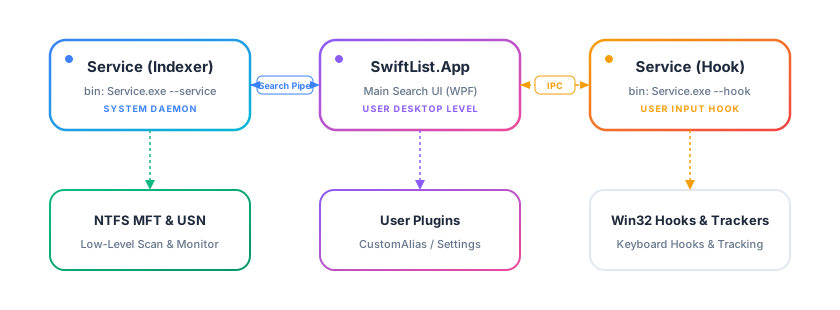
Process split
SwiftList runs as three separate processes, deliberately isolated by privilege level and lifetime:
SwiftList.Service— a Windows service running asLocalSystem. It owns all file indexing: reading the USN Journal and MFT for NTFS/ReFS drives, walking and watching other local file systems directly (they have no journal to read), scanning and caching network shares, and answering search queries over a named pipe. Running this at SYSTEM level means it can read the raw volume metadata every user account is allowed to see, without granting the interactive App process elevated privileges it doesn't need.SwiftList.App— the per-user, session-level WPF application: the search windows, the Settings window, hotkey handling, and the Actions/QuickLook UI. It talks to the Service over a named pipe (SearchService/UsnServicePipeServerinCore.Services) and never touches the disk index directly. It also hosts a second, per-user pipe of its own (AppSearchPipeService) that lets theslfCLI companion (see Command-Line Search) reuse the App's already-initialized search state — loaded alias/plugin providers, configured network-drive indexes — instead of a bare client process having to replicate that setup itself.SwiftList.Service --hook— a small separate process hosting the low-level global keyboard hook, so a hook crash or a misbehaving foreground app can't take the main App process down with it. It also loads plugins' window-integration adapters and runs their calls itself — see Where plugins fit below.
Shared Core
Core is a class library referenced by both the Service and the App. It holds:
- The search engine (
Core/SearchIndex/Fzf/*) — a fuzzy-matching implementation modeled on thefzfcommand-line tool's algorithm, plus a query parser (SearchQueryParser) for drive-letter targeting and path-mode search. - The runtime index (
Core/IndexV2/*) — a memory-mapped, columnar snapshot format built from USN/MFT reads, with an in-memory delta overlay for changes since the last snapshot. - IPC contracts (
SearchRequestMessage,SearchResponseBinarySerializer, ...) shared verbatim by both processes, so the App and Service always agree on the wire format. Logger— writes to per-process log files (service.log,app.log,hook.log), all readable (but not all writable) from the App's Settings → Service Status log viewer.
Where plugins fit
Plugins are .dll assemblies referencing PluginSdk and are loaded by the App process (see Getting Started and Packaging & Deployment). Two plugins ship with SwiftList itself as first-class examples — SwiftList.Plugins.CoreExtensions (built-in file actions and the shell context-menu integration) and SwiftList.Plugins.PinyinAlias (pinyin aliasing for Chinese filenames) — see Example Plugins for a walkthrough of both.
Plugins never talk to the Service directly; they interact with the App through the interfaces documented in the Plugin SDK Reference, and with the disk index (when they need custom indexed directories) through DirectoryIndexerService, which proxies to the Service on their behalf.
Window-integration adapters are the one exception to being App-only: IActivePathCollector, IFileDialogAdapter, and IInlineSearchAdapter implementations are loaded a second time into the Hook process, and their calls run there instead of in the App. This is what lets SwiftList drive an elevated File Explorer/file dialog/third-party file manager window even though the App itself always runs unelevated — Windows blocks a lower-privilege process from sending input to a higher-privilege one, so the call has to originate from a process running at the same privilege level as the target.